Most content teams have a publishing problem that isn’t actually a publishing problem. They’re producing articles, hitting word counts, optimizing titles — and still watching pages sit on page 3. The issue is almost always upstream: no brief, or a brief so thin it gave the writer nothing real to work with.
A content brief is the document that tells a writer exactly what to write before they write a single word. Not a vague topic title. Not “write 2,000 words about X.” A proper brief answers: What does this article need to cover? What heading structure should it follow? How long should it be? Which entities and concepts must appear? What’s the search intent? What internal links go where?
This guide covers everything — what a content brief is, what it must include, how to create one without spending 45 minutes on manual research, and how to use one to consistently produce content that ranks.
What Is a Content Brief? (Quick Definition)
A content brief is a strategic document given to a writer before they begin an article. It defines the target keyword, search intent, required heading structure, word count target, entity terms to cover, internal and external links, meta fields, and the call-to-action. The brief is built from competitor research — not assumptions — so every article is grounded in what already ranks.
Why Content Briefs Exist (and Why Teams That Skip Them Suffer)
Here’s a pattern every SEO manager has lived through. A writer delivers a 2,400-word draft. It reads well. It’s on topic. But the editor opens it and immediately notices the article missed three subtopics that every ranking competitor covers. Back it goes for revisions. Two days later, it comes back. Still missing the FAQ section. One more round. Four days of back-and-forth for a single article.
That’s a brief problem, not a writer problem.
When a writer has no brief, they’re making judgment calls on every section. They don’t know your word count target, don’t know which headings competitors use, and can’t know which entity terms need to appear for topical relevance. The result is content that’s technically acceptable but strategically wrong.
Teams that use consistent, data-driven briefs report two clear outcomes:
- Fewer revision cycles — writers who receive a full brief typically need 60% fewer revision rounds because they had the right instructions from the start
- Faster ranking velocity — articles built on competitor-sourced heading structures tend to match what Google already considers the right subtopics for a query
The brief doesn’t write the article. But it eliminates the guesswork that causes most articles to fail.
Content Brief vs Content Outline: These Are Not the Same Document
The most common source of confusion in content production is treating these two terms as interchangeable. They’re not — and mixing them up leads to incomplete briefs and frustrated writers.
A content brief is a strategy document. It’s created by the SEO manager or strategist, and it contains everything the writer needs to know before they begin. A content outline is the heading structure inside that brief — it’s one element of the brief, not the whole thing.
| Document | Who Creates It | What It Contains | When It’s Created |
|---|---|---|---|
| Content Brief | SEO manager / strategist | Keyword, intent, outline, word count, entities, links, meta, CTA, tone | Before writing begins |
| Content Outline | Writer (or included in brief) | H1/H2/H3 heading structure, section notes | Inside the brief, or drafted after receiving the brief |
Think of it this way: the brief is the complete instruction set. The outline is one page of that manual. You need both — but only one of them is a strategy document. For a deeper look at this distinction, see content brief vs content outline.
The 12 Elements Every Content Brief Must Include
A brief is only as useful as the information it contains. Strip it down too far, and it becomes a vague prompt. Overload it, and writers ignore half of it. The right brief is specific and complete — typically one to two pages, covering these twelve elements.
1. Primary Keyword and Search Intent
The keyword the article targets and a clear statement of intent. Is this query informational (the reader wants to learn), commercial (they’re comparing options), transactional (they’re ready to buy), or navigational (they’re looking for a specific site)? A mismatch between intent and article format is the single most common reason well-written content doesn’t rank.
2. Target Word Count (With Statistical Range)
Not a guess. Not “write 1,500 words.” A word count derived from the actual competitive landscape: the 25th percentile (P25), median, and 75th percentile (P75) of the top-ranking pages for that keyword. These three numbers tell a writer the competitive floor, the middle ground, and the ceiling. Hitting the median means competing with the average. Targeting P75 means over-delivering.
3. Heading Outline (Scored by Competitor Frequency)
H2 and H3 headings extracted from competitor pages, ranked by how many competitors include them. A heading that appears in 4 of 5 top-ranking pages is a “must-have.” A heading appearing in 2 of 5 is “recommended.” A heading appearing in only 1 is context-dependent. This frequency scoring tells a writer where to spend their words.
4. Entity Terms and NLP Concepts
The high-frequency terms that appear across competitor body text — concepts like “task assignment,” “sprint planning,” or “latency” depending on your niche. These are the topical signals Google uses to assess whether an article genuinely covers a subject. An article missing key entity terms will lose to an article that includes them, even with identical headings.
5. Target URL and Slug
The exact slug the published article should use. Finalize this before writing begins — changing a slug after publication creates redirect chains.
6. Internal Links
Specific internal links to include: the anchor text, the destination URL, and the section where the link should appear. Internal links are not something to leave to writer judgment. They serve two purposes: distributing page authority and helping Google understand topical relationships between your content.
7. External Links
Two to three authoritative external sources relevant to the article’s claims. Citing credible sources signals E-E-A-T. Specify the anchor text and target URL to prevent writers from linking to competitors or low-authority sites.
8. Meta Title and Meta Description
The SEO title (under 60 characters) and meta description (under 155 characters) should be in the brief, not added as an afterthought at publish. The writer who understands the article’s angle is often better positioned to write these than an editor who reads the draft three days later.
9. FAQ Section Questions
Specific questions to answer at the end of the article, derived from “People Also Ask” data and heading combinations that surface as SERP features. FAQ sections increase featured snippet eligibility and match question-type search queries.
10. Call-to-Action
The specific conversion goal for the article. What should the reader do after reading? Click through to a tool? Download a template? The CTA should be written out in the brief — not left to the writer to invent.
11. Tone and Audience
A two-sentence description of who this article is for and how it should read. “This is for early-stage startup founders who have heard of SEO but never written a brief. Tone: direct, practical, no jargon.” Writers who understand the audience write tighter first drafts.
12. Competitor URLs Analyzed
The 3–5 competitor URLs whose content was analyzed to generate the brief. Including these lets writers see the competitive context for themselves — and prevents them from accidentally mirroring a competitor’s structure too closely.
For the full breakdown of each element with example values, see what a content brief should include.
Generate your first content brief free — no signup needed
How to Create a Content Brief: The Step-by-Step Process
Creating a brief manually takes 30–45 minutes per article when done properly. Here’s the workflow, broken down by step.
Step 1: Choose Your Target Keyword and Map Its Intent
Start with the keyword you want to rank for. Then open an incognito browser, search it, and read the SERP. What format do the top results use? Are they listicles, step-by-step guides, definition pages, or comparison articles? That format tells you the dominant search intent. Match it or compete on a different angle — but do it deliberately.
Step 2: Collect the Top-Ranking URLs
Pull the top 5–7 organic results (skip ads, Reddit, and YouTube unless they dominate). These are the pages you’ll analyze to build your heading outline, word count benchmark, and entity term list.
Step 3: Extract Heading Structure by Frequency
Open each competitor page. Copy every H2 and H3 heading into a spreadsheet. Count how many pages include each heading variation (accounting for wording differences). Headings appearing in 3+ pages are almost certainly must-have sections. This step alone usually takes 20–30 minutes manually.
Step 4: Benchmark Word Count Statistically
Count the words on each competitor page (or use a browser plugin). Calculate the median across all pages. This is your true word count target — not the average, which gets skewed by outliers. The P25 and P75 give you the floor and ceiling.
Step 5: Extract Entity Terms
Scan competitor body text for recurring high-frequency terms that don’t appear in the headings. These are the supporting concepts and entities that make a piece topically authoritative. If every competitor page about “home office setup” mentions “ergonomic chair,” “monitor height,” and “cable management” — your brief needs those terms in it.
Step 6: Build the FAQ List
Pull the “People Also Ask” questions from the SERP for your keyword. Cross-reference them with H2/H3 headings from competitor pages. The overlap between these two sources gives you the highest-value FAQ questions — ones that both rank on their own and support featured snippet eligibility.
Step 7: Plan Internal and External Links
Identify 2–3 existing articles on your site that are relevant and specify exactly where in the article to link to them. Do the same for 2 external authority sources. Write out the anchor text explicitly — don’t leave it to the writer to choose.
Step 8: Write the Meta Fields and CTA
Write the SEO title, meta description, and primary CTA for the article. These take 5 minutes when written alongside the brief — and 30 minutes of confusion when added retroactively.
For a more advanced breakdown of this process, see how to write a content brief step by step.
What the Manual Process Actually Costs You
At 30–45 minutes per brief, a team publishing 20 articles per month spends 10–15 hours a month on brief creation alone. That’s before writing, editing, or publishing. For an agency managing 5 clients at similar volume, that’s 50–75 hours monthly dedicated to a preparatory document — a cost that compounds as the content program scales.
The deeper problem is consistency. Manual briefs vary by who creates them. One SEO manager runs a thorough competitor analysis. Another pulls three headings from memory and calls it a day. The result is an inconsistent content quality that makes it impossible to identify what’s actually working.
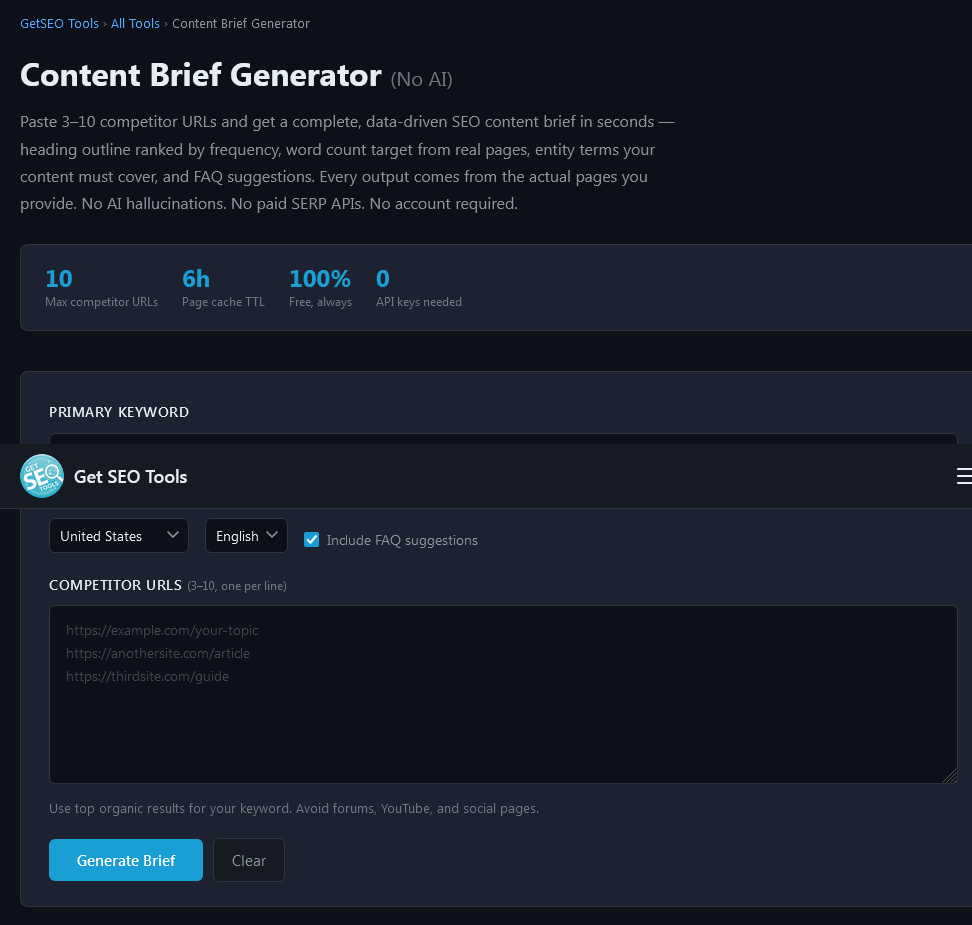
This is the gap the Content Brief Generator was built to close. You provide a keyword, a target country, a language, and 3–10 competitor URLs. The tool fetches each competitor page server-side — not AI-generated summaries, actual live HTML — and extracts the heading structure, word count range, entity terms, and FAQ suggestions in about 60 seconds.
Here’s what a realistic output looks like for the keyword “email marketing best practices”:
- Must-have headings: “What Is Email Marketing?” / “How to Build an Email List” / “Email Segmentation” / “Subject Line Best Practices” / “Email Marketing Metrics to Track”
- Recommended headings: “A/B Testing Email Campaigns” / “Email Frequency” / “How to Avoid Spam Filters”
- Word count target: P25 = 1,700 words | Median = 2,450 words | P75 = 3,600 words
- Entity terms: open rate, click-through rate, list segmentation, automation workflow, drip campaign, unsubscribe rate, double opt-in, sender reputation
- FAQ suggestions: “How often should you send marketing emails?” / “What is a good email open rate?” / “How do you grow an email list from scratch?”
That output — which would take 35 minutes to replicate manually — is generated in under a minute. More importantly, it’s reproducible. Every brief produced by the tool follows the same methodology, so quality stays consistent regardless of who on the team generates it.
Who Uses Content Briefs (and Who Should Be Using Them)
Content briefs are not just for large content teams. The use case is almost universal for anyone publishing content with an intent to rank.
| Role | How Briefs Help | Volume Where Briefs Pay Off |
|---|---|---|
| Solo blogger / creator | Removes guesswork, reduces revision time, improves ranking rate | 2+ articles per month |
| In-house SEO manager | Standardizes instructions to writers, reduces briefing meetings, speeds review cycles | 5+ articles per month |
| Content agency | Enables scale across multiple clients without quality degradation; brief = repeatable deliverable | 10+ articles per month per client |
| Startup founder | Levels the playing field against bigger competitors through structured, data-driven content | Any volume — cost of a bad article is high at low volume |
| Freelance writer | Protects against revision requests by requesting a brief before starting | Every project |
The counterintuitive truth about briefs for solo creators: the lower your publishing volume, the more important each brief becomes. When you publish 50 articles a month, 5 misses are a rounding error. When you publish 4, each one has to count.
Common Content Brief Mistakes (and How to Avoid Them)
Most brief failures fall into one of five patterns. Each is easy to avoid once you know to look for it.
Mistake 1: Using Average Word Count Instead of a Statistical Range
Averaging the word counts of 5 competitor pages produces a number skewed by outliers — one unusually long article inflates the whole calculation. Use median, P25, and P75 instead. This gives your writer a floor, a competitive midpoint, and a ceiling.
Mistake 2: Listing Headings Without Frequency Data
Handing a writer a list of 15 H2 suggestions without indicating which ones appear in 4 out of 5 competitors versus which one appeared once leads to wrong prioritization. A heading from 1 competitor might be a niche angle; a heading from 5 competitors is a structural expectation.
Mistake 3: Skipping Entity Terms
Headings tell a writer what to write about. Entity terms tell them which concepts must be woven into the body text. Briefs that include only a heading outline produce articles with the right sections but thin supporting content — which is increasingly what Google’s quality systems flag as shallow.
Mistake 4: No Internal Link Plan
Internal links added by writers without guidance tend to be random — they link to whatever article they just happened to mention, not to pages that benefit from the equity. Specifying the anchor text, destination, and section placement in the brief is the only way to build a coherent internal link architecture at scale.
Mistake 5: A Brief That’s Vague About Intent
A keyword like “CRM software” can be informational (“what is CRM software”), commercial (“best CRM software for small business”), or even navigational. A brief that says “write about CRM software” without stating the search intent produces a draft that the writer had to guess their way through — and that guess is often wrong.
For the full breakdown of brief errors and their fixes, see your first content brief in under 30 minutes.
Content Brief Formats: Which One Fits Your Workflow
There is no single “correct” brief format. The right format depends on your team size, publishing volume, and how closely you work with writers.
The Lightweight Brief (Solo Creators, Low Volume)
One page. Keyword, intent, 5–8 must-have headings, word count range, 3–5 entity terms, one internal link, and the meta fields. Takes 10–15 minutes to fill out. Good enough to guide a self-directed writer who knows their craft. Not good enough for agency-scale quality control.
The Standard Brief (In-House Teams, 5–20 Articles Per Month)
Two pages. All 12 elements covered. Heading structure annotated with frequency scores. Entity terms grouped by section. Internal and external links fully specified. FAQ questions listed. This is the format most established content teams use because it reduces revision cycles without becoming a burden to produce.
The Full-Detail Brief (Agencies, High Volume, Freelance Writers)
Two to three pages. Includes everything in the standard brief plus: a competitor analysis summary (top 5 pages with key differentiators noted), audience persona details, brand voice guidelines or a reference to the style guide, and a section-by-section annotation explaining what each H2 should accomplish. This brief can be handed to a freelance writer who has never covered this topic before and expects them to deliver a strong first draft.
How to Use the Content Brief Generator (Step-by-Step)
The Content Brief Generator at getseo.tools is built for teams who need data-driven briefs fast. Here’s how the workflow runs:
- Enter your primary keyword — the exact search term you want to rank for (e.g., “B2B lead generation strategies”)
- Select your target country and language — results are localized so you’re analyzing the competitors actually ranking in your market
- Paste 3–10 competitor URLs — the top organic results for your keyword from Google. The tool fetches the live HTML of each page server-side, so you’re working with actual current content, not cached or AI-summarized versions
- Click generate — in approximately 60 seconds, the tool returns a complete brief: frequency-ranked headings, statistical word count range, entity term list, and FAQ suggestions
Take the keyword “B2B lead generation strategies” as an example. After pasting five competitor URLs and running the tool, you’d see output like:
- Must-have headings: “What Is B2B Lead Generation?” / “Inbound vs Outbound Lead Generation” / “Best B2B Lead Generation Channels” / “How to Qualify B2B Leads” / “B2B Lead Generation Metrics”
- Word count target: P25 = 1,900 | Median = 2,800 | P75 = 4,100
- Entity terms: MQL, SQL, conversion rate, content marketing, LinkedIn ads, lead scoring, sales funnel, cold outreach, buyer persona, CRM integration
- FAQ suggestions: “What is the best B2B lead generation strategy?” / “How do you generate B2B leads without cold calling?” / “What is a good B2B lead conversion rate?”
This output becomes the spine of the brief. The strategist adds the internal link plan, the CTA, the meta fields, and the tone notes — and hands a complete, data-grounded brief to the writer in under 10 minutes total.
No AI hallucinations. No paid SERP API. No account required.
Content Briefs and E-E-A-T: The Connection Most Teams Miss
Google’s quality systems evaluate content against four signals: Experience, Expertise, Authoritativeness, and Trustworthiness. A brief doesn’t automatically produce E-E-A-T content — but a brief built the right way creates the conditions for it.
When the heading structure comes from competitor analysis, the article covers the same ground as pages Google already considers authoritative for that query. When entity terms from real competitor pages are included, the article demonstrates topical depth across the subject. When external links to authoritative sources are specified in the brief, the article builds credibility rather than existing in isolation.
None of this replaces real expertise in the writing. But a well-constructed brief makes sure that expertise gets expressed in a structure Google can evaluate and reward.
According to Google’s helpful content guidance, the questions searchers should be able to answer after reading your content include: Does the content demonstrate first-hand expertise? Does it fully cover the topic? Is the information trustworthy? A brief that forces the writer to address the right headings and entity terms is also forcing them to answer those questions — whether they realize it or not.
For more on building E-E-A-T signals directly into the briefing process, how Google processes structured documents explains how content organization affects indexing and relevance assessment.
Ready to stop guessing and start briefing from real data?
→ Generate your content brief in 60 seconds — completely free
Frequently Asked Questions
What is a content brief in SEO?
A content brief is a pre-writing document that tells a writer what an article needs to cover to rank for a specific keyword. It typically includes the target keyword, search intent, heading outline (derived from competitor analysis), word count target, entity terms, internal links, external links, FAQ questions, and meta fields. A brief ensures writers produce content that matches what Google already considers authoritative for that query — before the first draft is written.
What should be included in a content brief?
A complete content brief includes 12 elements: primary keyword, search intent, word count range (P25/median/P75), frequency-scored heading outline, entity terms, target slug, internal link plan, external link plan, meta title and description, FAQ questions, call-to-action, and audience/tone notes. Briefs that skip entity terms or internal link planning are the most common cause of articles that require heavy revision. For the full breakdown, see what a content brief should include.
How long does it take to create a content brief?
A manual brief built from competitor research takes 30–45 minutes per article. This includes extracting competitor headings, benchmarking word counts, identifying entity terms, and planning links. Using a tool like the Content Brief Generator reduces this to under 5 minutes — the tool handles the competitor extraction and analysis automatically; the strategist only needs to add the internal link plan and meta fields.
Is a content brief the same as a content outline?
No. A content outline is the heading structure — H1, H2s, and H3s. A content brief contains the outline plus every other strategic element: keyword, intent, word count, entity terms, links, meta fields, and CTA. Think of the outline as one component inside the brief. Teams that treat these as synonyms typically end up with incomplete briefs that don’t give writers enough direction. For the full comparison, see content brief vs content outline.
Do solo bloggers really need a content brief?
Yes — arguably more than large teams. When you publish 4–6 articles per month, each article has to count. A brief takes 10–15 minutes to fill out and eliminates the most common reason articles don’t rank: missing subtopics, wrong word count, and lack of entity coverage. At low publishing volumes, one misaligned article is a significant cost. A brief makes each article a deliberate, research-backed decision rather than a guess.
How is a content brief different for a pillar page vs a blog post?
A pillar page brief is longer and covers more ground. A blog post brief might specify 5–8 H2 sections and target 1,500–2,500 words. A pillar page brief typically specifies 10–15 H2 sections, multiple H3 subsections, 3,000–5,000 target words, a broader entity term list, and a more comprehensive internal link plan (because the pillar links to all cluster articles). The structure of the brief scales with the scope of the article it’s guiding.
Final Thoughts
Content that fails to rank almost always fails before writing begins. The heading structure was guessed. The word count was arbitrary. The entity terms that signal topical depth to Google were never identified. A content brief solves all three problems with a single, reusable workflow.
Whether you’re a solo blogger publishing twice a month or an agency managing 100 articles at a time, the brief is the document that turns SEO strategy into concrete writing instructions — and writing instructions into content that actually competes. The only question is whether you build yours manually, at 30–45 minutes each, or let a tool do the analysis while you focus on the strategy.
Ready to stop guessing and start briefing from real data?
→ Generate your content brief in 60 seconds — completely free