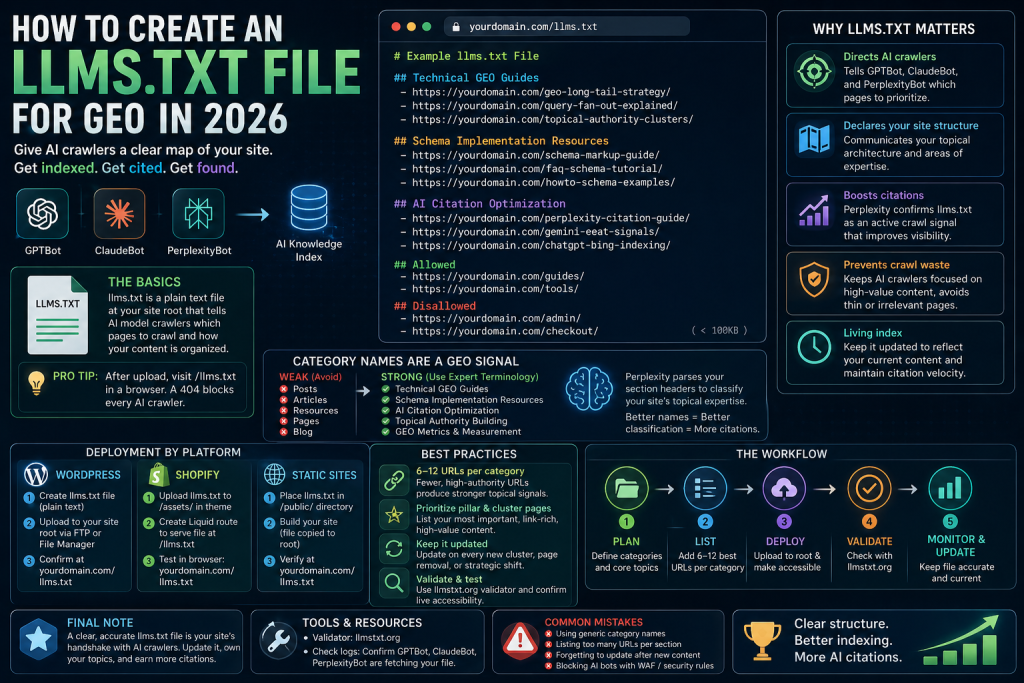
This guide covers the full file structure, the platform-specific deployment steps for WordPress and Shopify, the category naming strategy most teams get wrong, and why a stale llms.txt actively hurts your AI citation rate. By the end, you’ll have everything you need to build and maintain a file that AI crawlers can actually use.
If you’re new to how llms.txt fits into a broader AI search strategy, start with our GEO long-tail keyword strategy guide — it covers the query fan-out mechanics that make crawl control so important.
What llms.txt Is and Why It Changes AI Crawl Behavior
An llms.txt file is a plain text document placed at your site root that tells AI model crawlers which pages to prioritize when building their knowledge index of your site.
It was proposed by Answer.AI as a standard for AI-readable site structure — analogous to how robots.txt gave webmasters control over search engine crawlers in the early web. The difference is the audience: llms.txt targets GPTBot, ClaudeBot, and PerplexityBot, not Googlebot.
Cloudflare adopted it as a supported standard for AI crawler management. Perplexity has confirmed it as an active crawl signal — meaning pages listed in a correctly structured llms.txt file are more likely to be indexed and cited in Perplexity’s AI-generated answers.
Here’s where most teams get it wrong: they treat llms.txt as a minor technical task — something to tick off a checklist. In practice, it’s a topical authority declaration. The file tells AI systems not just what pages exist, but how your content is organized and what subjects your site specializes in.
Without it, AI crawlers make their own inferences about your site structure — and those inferences are often incomplete or misaligned with your actual content strategy.
💡 Pro-Tip: After uploading your llms.txt file, verify it’s accessible by visiting
https://yourdomain.com/llms.txtdirectly in a browser. A 404 response means the file wasn’t placed at root correctly — a silent error that blocks every AI crawler trying to parse your site structure.
The Full llms.txt File Structure (With Real Examples)
A correctly structured llms.txt file uses section headers, URL listings, and optional allow/disallow directives to communicate your site’s topical architecture to AI crawlers.
Instead of generic labels, your file should look like this working example from getseo.tools:
Plaintext# Get SEO Tools — AI Crawler Index ## GEO Strategy & AI Optimization - https://getseo.tools/geo-long-tail-keyword-strategy-2026/ - https://getseo.tools/create-llmstxt-file-geo-2026/ - https://getseo.tools/geo-topical-authority-guide/ ## Technical Schema Resources - https://getseo.tools/schema-markup-for-ai-overviews/ - https://getseo.tools/faq-howto-json-ld-guide/ ## AI Metrics & Tracking - https://getseo.tools/free-ai-citation-tracking-tool/ - https://getseo.tools/geo-vs-seo-metrics-2026/ ## Allowed - https://getseo.tools/tools/ - https://getseo.tools/guides/ ## Disallowed - https://getseo.tools/wp-admin/ - https://getseo.tools/search/Each
##header defines a topic cluster. Each URL under it tells the crawler which pages belong to that cluster. The crawler then builds a topical map of your site based on this structure — which directly influences how your content gets classified in its knowledge index.You can also specify allowed and disallowed paths to give crawlers more granular guidance. Keep the file under 100KB. Long files with hundreds of URLs dilute topical signal. Prioritize your highest-authority pages — pillar articles, long-form cluster guides, and pages with strong internal linking — over indexing your entire archive.
💡 Pro-Tip: List a maximum of 8–12 URLs per category section. AI crawlers use llms.txt to build a topical snapshot of your site — if a category has 40 URLs, the signal becomes diffuse. Fewer, higher-authority URLs per section produce stronger topical classification signals.
For a comparison of how llms.txt interacts with robots.txt — and which file controls which crawlers — see our llms.txt vs robots.txt guide for AI crawlers.
Why Category Names Are a Hidden GEO Signal
The category names you use in llms.txt directly influence how Perplexity classifies your site in its knowledge index — and most teams waste this entirely.
Perplexity’s crawler actively parses the ## section headers to build a topical map of the site. A site grouping pages under “Technical GEO Guides” and “Schema Implementation Resources” is classified differently than one using “Posts” and “Articles” — even when the underlying content is identical.
That difference matters because Perplexity’s citation logic weights topical classification. A site classified as a specialist source in “GEO optimization” will be cited more frequently for GEO-related queries than a site with no legible topical structure in its llms.txt.
The old approach was to mirror your CMS category structure in llms.txt — using whatever labels WordPress or Shopify assigned by default. The shift is to treat llms.txt section headers as a deliberate topical authority signal: use precise, expert-level terminology that matches how specialists in your field describe the domain.
Category Naming: What to Avoid vs What Works
| Weak Category Names (CMS Default) | Strong Category Names (Expert Terminology) |
|---|---|
| Posts | GEO Strategy Guides |
| Articles | Schema Markup Implementation |
| Resources | AI Citation Optimization |
| Pages | Technical SEO References |
| Blog | Topical Authority Building |
Every category name in llms.txt is a missed or captured opportunity for topical authority signaling. Choose names that a specialist would recognize immediately as describing your content focus — not names a CMS generated automatically.
How to Create and Deploy llms.txt on WordPress, Shopify, and Static Sites
Creating the file is straightforward. Deploying it correctly depends on your platform. Here’s the exact process for the three most common setups.
Step-by-Step: Creating Your llms.txt File
- Define your site’s primary topic categories.
Identify the 3–6 core subject areas your site covers. Use expert-level terminology for each — these become your##section headers. Do not use generic CMS labels. - List your highest-authority URLs under each category.
Under each header, list 6–12 full URLs. Prioritize pillar pages, long-form cluster guides, and pages with the strongest internal link profiles. Avoid thin pages, tag archives, and pagination URLs. - Create the file and upload it to your site root.
Save the file asllms.txt— plain text, UTF-8 encoding. Upload it so it resolves athttps://yourdomain.com/llms.txt. See platform-specific steps below. - Validate using llmstxt.org.
Run your file through the free validator at llmstxt.org to confirm correct syntax and URL formatting before AI crawlers encounter it. - Confirm live accessibility.
Visithttps://yourdomain.com/llms.txtin a browser and confirm the file loads correctly. A 404 or redirect means the file placement needs to be corrected.
WordPress Deployment
The simplest method is to upload llms.txt directly to your server’s root directory via FTP or your hosting file manager. Place it in the same folder as robots.txt — typically /public_html/.
Alternatively, use a WordPress plugin that supports custom root-level file management, or add a rewrite rule in your .htaccess file to serve the llms.txt from a custom location. Confirm the file isn’t blocked by any existing security rules in your server configuration.
Shopify Deployment
Shopify doesn’t allow direct root file uploads. Instead, upload llms.txt to your theme’s assets/ folder via the theme editor, then create a custom route using a Liquid template to serve it at /llms.txt. This requires adding a new page template and configuring the URL handle in Shopify’s navigation settings.
Static Site Deployment
For static sites built with Next.js, Gatsby, or Hugo, place llms.txt in the /public/ or /static/ directory — whichever folder the framework copies directly to the output root at build time. Confirm the file is included in the production build output before deploying.
💡 Pro-Tip: After deployment, use a bot-testing tool or check your server access logs to confirm GPTBot and PerplexityBot are successfully fetching your llms.txt file. If they’re hitting a 403 or 404, your AI crawler visibility is zero regardless of how well the file itself is structured. Common causes: WAF rules blocking non-Googlebot user agents, or aggressive security plugins on WordPress that deny unfamiliar crawlers by default.
If your llms.txt is deployed but AI citations still aren’t appearing after 60 days, the most common cause is a configuration error rather than a content gap. See our common llms.txt mistakes and fixes guide for a step-by-step troubleshooting workflow.
llms.txt Is a Living Index — Not a One-Time Setup
The most common mistake I see after teams successfully deploy llms.txt is treating it as a configuration file — something you set up once and forget. That framing is wrong, and it costs real citation volume over time.
llms.txt must be updated whenever major changes happen to your site’s content architecture. Specifically, update the file when:
- A new content cluster launches (new pillar + supporting articles)
- The site’s primary focus areas shift or expand
- Significant new authority pages are published
- Deprecated or removed pages are still listed in the file
A stale llms.txt misrepresents your site’s current topical scope to AI crawlers. When Perplexity or ChatGPT’s retrieval pipeline processes your file, it builds a snapshot of what your site covers. If that snapshot is six months out of date, newly published content may be deprioritized or ignored entirely — even if it’s technically excellent.
The practical implication: every time you launch a new cluster, updating llms.txt should be a mandatory step in your publishing checklist, not an afterthought. The goal is zero lag between new content going live and AI crawlers having an accurate index of it.
For teams publishing at scale, manual llms.txt maintenance creates cumulative citation gaps. Our advanced llms.txt optimization guide for SaaS sites covers automation pipelines — including GitHub Actions and Cloudflare Workers — that regenerate the file on every deploy.
This living index concept also connects directly to how AI systems measure topical authority. A consistently updated llms.txt doesn’t just help individual pages get indexed — it reinforces the domain’s position as a specialist source on its core topics, which compounds citation probability across the entire cluster.
Frequently Asked Questions
What is an llms.txt file and why does it matter for GEO?
An llms.txt file is a plain text document placed at your site root that tells AI crawlers like GPTBot, ClaudeBot, and PerplexityBot which pages to prioritize. Proposed by Answer.AI and confirmed by Perplexity as an active crawl signal, it directly influences how AI systems index and cite your content.
How is llms.txt different from robots.txt?
robots.txt controls traditional search engine crawlers like Googlebot. llms.txt is designed specifically for AI model crawlers — GPTBot, ClaudeBot, and PerplexityBot. The two files serve different crawler audiences and must be maintained separately. See our llms.txt vs robots.txt comparison for a full breakdown.
What section names should I use in llms.txt?
Use precise, expert-level category names that reflect your content specialization — for example, “Technical GEO Guides” or “Schema Implementation Resources”. Avoid generic CMS labels like “Posts” or “Pages”, which send weak topical signals to AI knowledge systems and waste the classification opportunity the file provides.
How often should I update my llms.txt file?
Update llms.txt whenever you publish a new content cluster, remove major pages, or shift your site’s topic focus. A stale file misrepresents your current content scope to AI crawlers — causing newly published content to be deprioritized or missed entirely during reindexing cycles.
How do I validate my llms.txt file?
Use the free validator at llmstxt.org to check syntax, URL formatting, and structural integrity. After validation, confirm the file is accessible by visiting https://yourdomain.com/llms.txt directly in a browser and checking for a 200 response.
Key Takeaways
- llms.txt is a topical authority declaration, not just a crawl file — it tells GPTBot, ClaudeBot, and PerplexityBot how your site’s content is organized and what subjects you specialize in.
- Proposed by Answer.AI, adopted by Cloudflare, confirmed by Perplexity — llms.txt is now a recognized crawl signal across the major AI platforms, not an experimental format.
- Category names are a GEO signal — expert-level section headers like “Technical GEO Guides” outperform generic CMS labels like “Posts” because Perplexity’s crawler uses them to classify your site’s topical specialization.
- List 6–12 high-authority URLs per category section — more than that dilutes the topical signal; fewer makes the site’s expertise invisible to AI crawlers.
- Platform deployment differs by CMS — WordPress uses root-level upload or FTP; Shopify requires a Liquid template route; static sites place the file in the
/public/directory at build time. - Validate before AI crawlers hit the file — use llmstxt.org to catch syntax errors, then confirm live accessibility via browser at
/llms.txt. - llms.txt is a living index — update it on every new cluster launch, page removal, or strategic focus shift; a stale file causes newly published content to be deprioritized by AI reindexing cycles.
Sources and further reading: Answer.AI — llms.txt proposal and specification · llmstxt.org — validator and official standard documentation · Search Engine Land — AI crawler coverage 2025–2026