There are dozens of SEO audit tools available. Some are free. Some cost hundreds of dollars a month. And from the outside, it is not always clear what you actually get for the price difference.
This page gives you a straight answer. It explains what a free SEO audit tool can realistically do, where free tools have limits, and what paid tools add that genuinely matters. By the end, you will know which option fits your situation — without having to sign up for anything to find out.
This is not a ranking of every tool on the market. It is a practical comparison of two categories — free and paid — so you can make a confident decision.
If you are new to SEO audits, start with what an SEO audit covers → before reading this page.
In this guide:
What Can a Free SEO Audit Tool Actually Do?
A good free SEO audit tool can do more than most people expect. For small and medium-sized sites, the coverage is often enough to find the issues that matter most.
Here is what most free audit tools cover:
- Crawlability check — Can search engines access and read your pages? Free tools check for blocked pages, robots.txt issues, and crawl errors.
- On-page SEO checks — Missing title tags, duplicate meta descriptions, incorrect heading structure, and missing alt text.
- Broken links and 404 errors — Pages that return errors when visited or linked to.
- Basic page speed — Whether your pages load at an acceptable speed. Some tools flag slow pages; others point you to Google PageSpeed Insights ↗ for details.
- HTTPS status — Whether your site uses a secure connection and whether mixed content issues exist.
- Redirect issues — Redirect chains or loops that slow down crawling and pass less link equity.
- Basic indexability — Whether key pages are being indexed by Google or accidentally blocked.
For a site owner checking their own blog, small business website, or portfolio, this is a solid starting point. Most of the issues that actually hurt rankings on small sites will show up here.
The gap between free and paid is not about which issues get detected. It is about depth, volume, and workflow.
What Do Paid Tools Add That Free Ones Do Not?
Paid SEO audit tools — tools like Semrush, Ahrefs, or Screaming Frog’s paid version — are built for larger sites, agencies, and teams managing multiple clients. What they add is real, but it is not always necessary.
Higher crawl limits
Free tools often limit how many pages they will crawl in one audit — commonly 100 to 500 pages. For a 50-page blog, that is no problem. For a 10,000-page e-commerce site, it is a hard ceiling. Paid plans typically crawl thousands or millions of pages per run.
Historical data and trend tracking
Paid tools store your audit history so you can compare results over time. You can see whether your health score improved after a fix, or whether a new issue appeared after a site update. Free tools usually show only the current snapshot.
Backlink analysis
Most free audit tools do not include backlink data. Paid tools let you see who is linking to your site, the quality of those links, and whether any toxic links are hurting your rankings. You can get limited backlink data free from Google Search Console’s Links report ↗, but it is not as detailed as what paid tools provide.
Keyword ranking data
Paid platforms often bundle keyword tracking alongside audit tools. You can see which positions you hold and how they change over time. Free audit tools typically do not include this.
Team access and client reporting
If you are an agency managing 20 client sites, you need features like shared workspaces, white-label reports, and multi-user access. These are standard in paid plans and generally absent in free tools.
API access and integrations
Developers and large teams sometimes need to pull audit data into their own dashboards or workflows. Paid tools offer API access. Free tools do not.
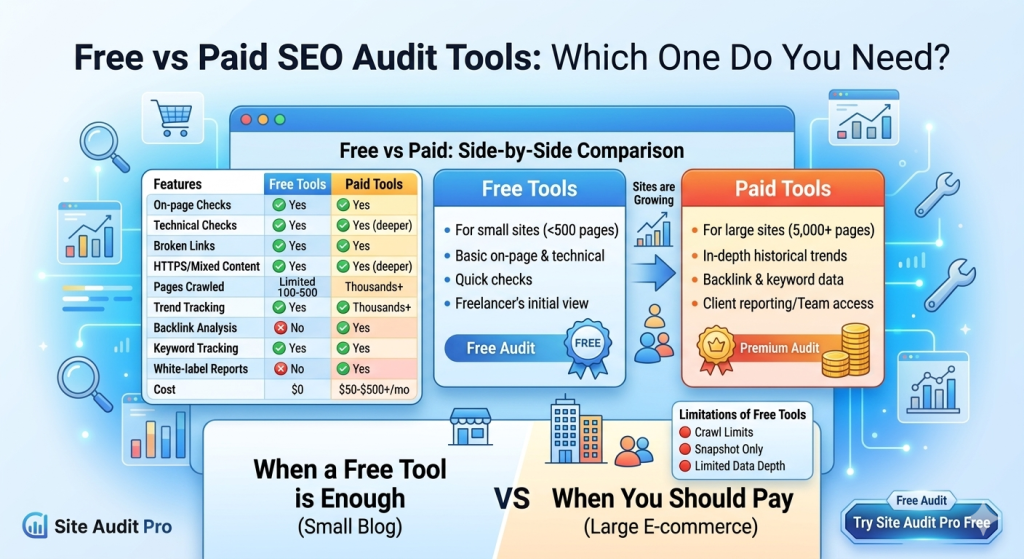
Free vs Paid: Side-by-Side Comparison
Here is how the two categories compare across the features that matter most for typical users.
| Feature | Free tools | Paid tools |
|---|---|---|
| On-page SEO checks | ✅ Yes | ✅ Yes |
| Technical SEO checks | ✅ Yes | ✅ Yes (deeper) |
| Broken link detection | ✅ Yes | ✅ Yes |
| HTTPS / mixed content | ✅ Yes | ✅ Yes |
| Pages crawled per audit | Limited (100–500) | Thousands+ |
| Historical data / trend tracking | ❌ No | ✅ Yes |
| Backlink analysis | ❌ No | ✅ Yes |
| Keyword rank tracking | ❌ No | ✅ Yes |
| Team / multi-user access | ❌ No | ✅ Yes |
| White-label client reports | ❌ No | ✅ Yes |
| API access | ❌ No | ✅ Yes |
| Cost | $0 | $50–$500+/month |
When a Free Tool Is Enough
A free SEO audit tool will serve you well in most of these situations:
- You run a small blog, portfolio, or local business site — If your site has fewer than 500 pages and you are managing it yourself, a free tool gives you everything you need to find and fix the issues that actually affect your rankings.
- You are just starting out with SEO — A free tool is the right place to begin. There is no point paying for advanced features until you have addressed the basics.
- You want a quick site health check — If you have just launched a site, changed your hosting, or made a significant update, a free audit is a fast way to confirm nothing is broken.
- You are a freelancer auditing a client’s site for the first time — A free audit gives you a solid initial picture of the site’s health before you decide what tools you need for ongoing work.
- You do not need backlink data or rank tracking right now — If your main goal is fixing technical and on-page issues, free tools cover that completely.
Once you have your free audit results, you can cross-reference them against the SEO Audit Checklist → to make sure nothing was missed.
When You Should Pay for a Tool
There are genuine situations where a paid tool earns its cost. Here is when it makes sense to upgrade:
- Your site has more than 500 pages — If a free tool can only crawl 500 pages but your site has 5,000, you are not seeing the full picture. Paid tools remove that ceiling.
- You manage multiple client sites — Agencies and freelancers handling several sites at once need team access, scheduled crawls, and reporting features that only paid tools provide.
- You need historical comparisons — If you want to track how your site’s health score changes over weeks and months, you need a tool that stores audit history. Free tools give you a snapshot; paid tools give you a timeline.
- Backlink analysis is part of your strategy — If off-page SEO is a priority and you need detailed link data, a paid platform is the right investment. Google Search Console gives you basic link data for free, but it is limited compared to dedicated tools.
- You need white-label reports for clients — If you are presenting audit results under your own brand, paid tools handle that. Free tools generally do not.
- Your site is large, fast-growing, or heavily content-driven — At a certain scale, the time saved by more powerful tooling outweighs the monthly cost.
Honest Limitations of Free SEO Audit Tools
Free tools are genuinely useful, but they have real constraints worth knowing about before you rely on them.
Page crawl limits
The most common limitation. A free tool that crawls 100 pages may miss problems on page 101. If your site is growing, this ceiling will become a problem at some point. Check what limit applies to the free tool you are using before you run an audit.
No historical data
Most free tools show you a point-in-time result. They will not tell you whether your site got better or worse after your last update. You can work around this by taking screenshots or exporting results, but it requires discipline.
Limited backlink visibility
Free tools typically do not include backlink data. If you want to understand your link profile — which sites link to you, how many, and whether any are harmful — you will need a paid tool or use Google Search Console’s Links report ↗ as a partial substitute.
No rank tracking
A free audit shows you site health, not search position. If you want to know which keywords you rank for and how those positions change, that requires a separate paid tool or a platform that bundles both.
Less depth on some checks
Some free tools flag a problem but do not give you the full detail needed to fix it. Paid tools tend to go deeper — showing exactly which element on a page triggered the issue, with more context for the fix.
Our Recommendation for Most Users
If you are a site owner, blogger, freelancer, or small business owner managing your own site, start with a free tool. There is no reason to pay for features you will not use.
The best free SEO audit tool for most small and medium sites is one that covers technical checks, on-page issues, and basic link health — without requiring a sign-up or putting your results behind a paywall after the first scan.
Site Audit Pro is built for exactly this use case. It crawls your site, checks the things that actually affect rankings, and gives you a clear, prioritised report — all for free. You do not need an account to run your first audit.
Once you have your results, the step-by-step audit guide → will walk you through how to use them.
If your site grows past 500 pages, you start taking on agency clients, or you need rank tracking and backlink data alongside your audits — that is the right time to evaluate paid platforms. Until then, spending money on a paid tool is paying for features you do not yet need.
For most small and medium sites, Site Audit Pro gives you everything you need — for free.
No account. No credit card. No hidden limits for sites under 500 pages.
Frequently Asked Questions
Is a free SEO audit tool accurate enough to trust?
Yes, for the issues it covers. Free tools check real technical signals — broken pages, missing tags, crawl errors, HTTPS status — and the results are accurate. The limitation is not accuracy; it is depth and volume. They may not crawl every page or include backlink data, but what they do check is reliable.
What is the difference between Screaming Frog free vs paid?
Screaming Frog’s free version crawls up to 500 URLs and covers most on-page and technical checks. The paid version removes that limit and adds features like JavaScript rendering, scheduled crawls, Google Analytics integration, and more detailed reporting. For small sites, the free version is sufficient. For larger or more complex sites, the paid version is worth it.
Can I use Google Search Console instead of an audit tool?
Google Search Console is a free and valuable resource — it shows indexing status, Core Web Vitals, manual actions, and link data. But it is not a replacement for an audit tool. It shows you data from Google’s perspective on your already-indexed pages. An audit tool actively crawls your site and finds issues that Search Console does not report, like duplicate title tags, redirect chains, or missing alt text.
What does a paid SEO audit tool cost?
Entry-level paid plans for tools like Semrush or Ahrefs start around $100 to $130 per month. More comprehensive agency plans can reach $400 or more per month. Tools like Screaming Frog’s desktop version are cheaper — around $230 per year — and focus specifically on crawling and auditing rather than the full SEO platform.
Is Site Audit Pro really free?
Yes. Site Audit Pro is free to use for sites within its page limit. No account is required to run an audit and see your full results. There is no trial period that expires or a report hidden behind a paywall.
When should I move from a free tool to a paid one?
When the free tool’s limits start affecting what you can see or do. The most common triggers are: your site growing past the crawl limit, taking on client work that requires reporting features, or needing backlink and keyword data alongside your audit results.
No budget? No problem.
Site Audit Pro is free. Start your audit now — no account needed.