
Most SEO teams know robots.txt well. It sits at the root of your domain, tells Googlebot what to crawl, and has been part of the web stack since 1994. What fewer teams realize is that robots.txt was never designed to communicate with AI language models — and in 2026, that gap is costing sites their citation visibility. The llms.txt vs robots.txt decision is no longer a niche technical question. It directly affects whether platforms like Perplexity, ChatGPT, and Gemini surface your content in AI-generated answers. Understanding what each file controls — and how to run them together — is one of the most practical GEO moves you can make right now.
What Each File Actually Does
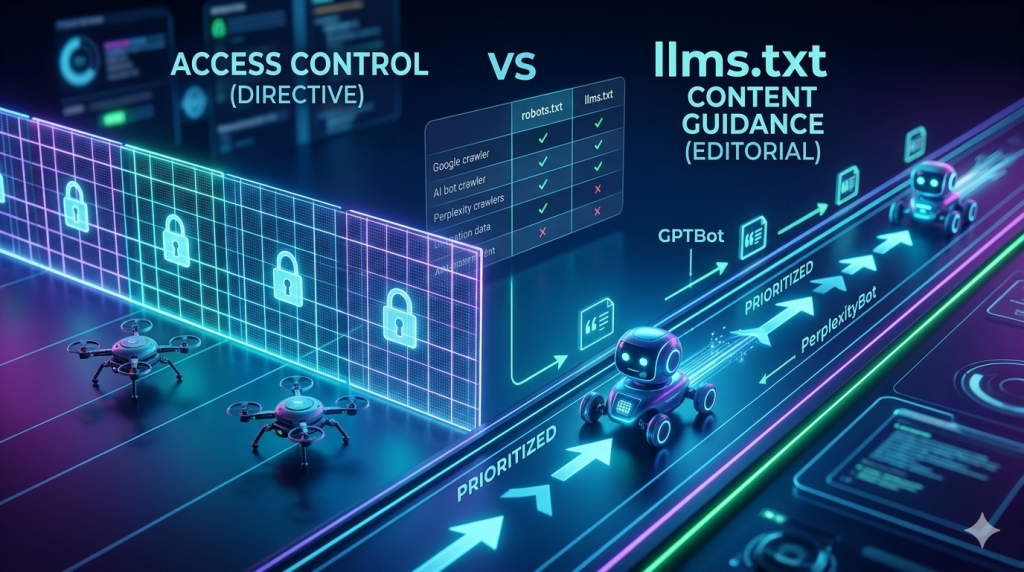
robots.txt controls crawler access. llms.txt guides AI content selection. These are fundamentally different jobs, and conflating them is one of the most common errors we see on audited sites.
robots.txt is a directive file. When Googlebot or GPTBot hits your domain, they read /robots.txt first. If a path is disallowed, they stop. The file does not explain your content — it enforces access. It has been part of the Robots Exclusion Protocol since 1994, and every major crawler respects it as a hard boundary.
llms.txt, by contrast, is a guidance file. It does not block or allow anything at the protocol level. Instead, it tells AI systems — specifically the large language models that power Perplexity, ChatGPT, and Gemini — which pages on your site carry the most authoritative, citable content. Think of it as an editorial index for AI crawlers, not a security gate.
The distinction matters because AI models do not just crawl — they select. A model building a response about a topic will pull from multiple indexed sources and rank them by relevance, authority, and quotability. llms.txt influences that selection process. robots.txt influences whether the crawler reached the content at all. Both layers are necessary. Neither replaces the other.
💡 Pro-Tip: Check your server logs for GPTBot, ClaudeBot, and PerplexityBot hits before configuring either file. If these bots are already crawling your site without hitting blocks, your baseline access is clean — llms.txt is your next priority.
How robots.txt Handles AI Crawlers
robots.txt controls AI crawlers through user-agent directives — the same mechanism it uses for Googlebot, but with different agent names. GPTBot is OpenAI’s crawler. ClaudeBot is Anthropic’s crawler. PerplexityBot crawls for Perplexity’s citation index.
Each of these bots checks your /robots.txt file on every visit. If you have a blanket disallow rule or no specific allow rule, some bots will treat your content as off-limits. Here’s where many sites get tripped up: they deploy aggressive robots.txt configurations for SEO reasons — blocking staging paths, parameter URLs, or admin sections — and accidentally catch AI bots in a catch-all disallow rule.
A standard AI-aware robots.txt entry looks like this:
User-agent: GPTBot
Allow: /

User-agent: ClaudeBot
Allow: /

User-agent: PerplexityBot
Allow: /
This explicitly grants access. Without these entries, some AI crawlers will fall through to your default rules — and if your default is restrictive, you lose citation opportunities before llms.txt even comes into play.
Importantly, blocking AI bots in robots.txt is sometimes intentional. If your content is proprietary, paywalled, or not suited for AI training, a targeted disallow is the correct approach. The key is making the decision deliberately — not by accident. We see far too many sites where AI crawlers are blocked simply because no one thought to add them to the allow list.
For a deeper look at structuring your llms.txt file itself, see our guide on how to create an llms.txt file for GEO — it covers the full file structure and platform implementation in detail.
What llms.txt Does Differently
llms.txt is an AI-native file that tells language models which content is worth prioritizing for citation — something robots.txt was never designed to communicate.
Proposed by Answer.AI and later adopted by Cloudflare as part of its AI Gateway infrastructure, llms.txt sits at /llms.txt on your domain. It lists your most important pages, organized into named categories that AI systems parse to understand your site’s topical structure.
That category layer is where llms.txt diverges sharply from robots.txt in practical terms. When Perplexity crawls your site, it does not just check access permissions — it builds a topical map of what your site covers. The category names in your llms.txt file directly feed that map. A site organized under headings like “Technical Guides” and “Platform Comparisons” sends very different authority signals than one using generic labels like “Posts” or “Pages.”
robots.txt communicates nothing about content quality, topic ownership, or citation priority. llms.txt exists precisely to fill that gap. It gives AI systems an editorial signal they cannot extract from crawl access rules alone.
This is the core reason both files are necessary. robots.txt gets the bot through the door. llms.txt tells it which rooms matter most.
💡 Pro-Tip: Perplexity’s crawler actively parses llms.txt category headers to build its topical index. Use precise, domain-specific terminology in your category names — not generic CMS labels. “SEO Methodology Guides” signals authority. “Blog Posts” signals nothing.
llms.txt vs robots.txt: Full Comparison
The table below covers the core differences that affect how each file functions in a GEO-optimized site architecture.
| Dimension | robots.txt | llms.txt |
|---|---|---|
| Primary function | Access control for crawlers | Content prioritization for AI models |
| File location | /robots.txt | /llms.txt |
| Mechanism | Directive (allow / disallow) | Guidance (index of prioritized content) |
| Who reads it | Googlebot, GPTBot, ClaudeBot, PerplexityBot, all crawlers | AI language model crawlers (Perplexity confirmed, Cloudflare adopted) |
| Enforced? | Yes — non-compliance is rare among major bots | No — voluntary guidance standard |
| Affects Google ranking? | Yes — directly controls Googlebot access | Indirectly (via topical authority signals) |
| Affects AI citations? | Partially — can block or allow AI crawlers | Directly — guides content selection priority |
| Format | User-agent + Allow/Disallow directives | Section headers + URL listings |
| Needs updating? | When site structure changes | When content strategy evolves |
| Standard age | 1994 (Robots Exclusion Protocol) | 2024 (proposed by Answer.AI) |
The most important row in that table is “Enforced.” robots.txt is a protocol-level directive that bots are expected to follow. llms.txt is a guidance standard — AI systems that support it use it to improve their content selection, but it carries no enforcement mechanism. That distinction shapes how you should think about each file: robots.txt as infrastructure, llms.txt as editorial strategy.
When to Use Each File — and When to Use Both
In most cases, you need both files running simultaneously. The scenario where only one file is sufficient is narrower than most guides suggest.
robots.txt alone is sufficient only when you want to block AI crawlers entirely — for example, on a paywalled platform where content is not meant for AI indexing. In that case, targeted disallow rules for GPTBot, ClaudeBot, and PerplexityBot in robots.txt achieve the goal. llms.txt adds no value if the bots cannot access the content anyway.
llms.txt alone makes sense in a theoretical scenario where you trust all crawlers to have full access and only want to guide AI prioritization. In practice, most sites have at least some paths that need access controls — admin areas, duplicate parameter URLs, staging environments — which means robots.txt is still required.
The dual-file setup is the correct default for any site pursuing GEO visibility. robots.txt handles access at the protocol level, ensuring AI bots can reach your priority content without tripping into blocked paths. llms.txt then provides the editorial layer that guides those bots toward your most citable pages once they are on the site.
Here is the mental model we use with clients: robots.txt is the front door policy. llms.txt is the guided tour inside. You need both to control the full experience an AI crawler has with your site.
For advanced SaaS implementations — including automation pipelines that keep llms.txt synchronized with your publishing schedule — see our guide on advanced llms.txt optimization for SaaS sites.
💡 Pro-Tip: When running both files, validate that your robots.txt allow rules explicitly cover the paths you list in llms.txt. A path that appears in llms.txt but is blocked in robots.txt is an invisible dead end for AI crawlers — the bot gets the signal but cannot retrieve the content.
Running Both Files Without Conflicts
Conflicts between llms.txt and robots.txt happen when allow rules in one file contradict the access logic of the other. The fix is systematic, not complicated.
The old approach was to treat robots.txt as a one-time configuration — set it up at launch, then leave it alone. That worked when Googlebot was the only crawler that mattered. Today, with GPTBot, ClaudeBot, and PerplexityBot all behaving differently and with AI citation visibility tied directly to what these bots can access, the same static approach creates invisible gaps.
Start by auditing your current robots.txt for catch-all disallow rules. A common culprit is Disallow: /wp-admin/ followed by a blanket Disallow: / under a wildcard user-agent — which catches every bot including AI crawlers not yet given an explicit allow rule. Add explicit allow blocks for GPTBot, ClaudeBot, and PerplexityBot above your wildcard rules so they are never caught by default restrictions.
Next, cross-reference your llms.txt URL list against your robots.txt rules. Every URL or path section listed in llms.txt should have a corresponding allow rule — or at minimum, no disallow rule — in robots.txt. This is a five-minute audit that prevents weeks of silent citation loss.
Finally, treat both files as living documents. When you publish a new content cluster, update llms.txt to include it. When you restructure your site, review robots.txt to ensure new paths are not accidentally restricted. The two files should evolve together — neither can reflect your current site if only one of them is maintained.
According to Search Engine Land’s 2025 GEO research, sites with mismatched access rules and content guidance files showed measurably lower AI citation rates compared to sites with synchronized configurations. The mechanics are not surprising: if an AI crawler cannot access the pages you designated as priority content, your llms.txt signal is wasted.
For a complete walkthrough of common configuration errors — including the specific syntax mistakes that cause silent bot blocking — see our troubleshooting guide on common llms.txt mistakes and fixes.
The broader principle here connects directly to your GEO strategy. Crawler access is not just a technical setting — it is the prerequisite for every other optimization. Schema, content freshness, entity signals — none of them function if the AI crawler never reaches the page. Getting robots.txt and llms.txt aligned is the foundational layer everything else builds on. For the full strategic picture, our GEO long-tail keyword strategy guide explains how crawler access connects to citation velocity across Perplexity, Gemini, and ChatGPT simultaneously.
You can validate your llms.txt file structure using the official validator at llmstxt.org. For robots.txt testing, Google Search Console’s URL Inspection tool remains the most reliable option for confirming access rules behave as intended.
Additional research on crawl configuration best practices is available via the Semrush blog’s technical SEO resources, which regularly covers evolving crawler behavior across both traditional and AI-driven platforms.
Frequently Asked Questions
Does robots.txt block AI crawlers like GPTBot and ClaudeBot?
robots.txt can block AI crawlers if you add specific directives for GPTBot, ClaudeBot, and PerplexityBot. However, blocking them prevents AI systems from indexing your content for citations. Use allow directives intentionally — not as a default.
What is the main difference between llms.txt and robots.txt?
robots.txt controls which pages crawlers can access. llms.txt tells AI models which content is most relevant for training and citation. They serve different purposes and both files can — and should — coexist on your site.
Do I need both llms.txt and robots.txt on my site?
Yes. robots.txt manages crawler access for both Google and AI bots. llms.txt guides AI models toward your most citable content. Running both simultaneously gives you full control over crawl access and AI content prioritization.
Can llms.txt replace robots.txt for AI crawlers?
No. llms.txt does not enforce access restrictions. It is a guidance file, not a directive file. robots.txt remains the authoritative file for access control. llms.txt complements it by signaling content relevance to AI systems.
Which AI platforms respect the llms.txt file?
Perplexity confirmed llms.txt as a crawl signal. Cloudflare adopted the standard for its AI Gateway. The format was proposed by Answer.AI and is gaining adoption across AI platforms — though formal support varies by platform.
Key Takeaways
- robots.txt is a directive file — it enforces access rules for all crawlers, including GPTBot, ClaudeBot, and PerplexityBot, through user-agent directives.
- llms.txt is a guidance file — it does not block or allow anything, but signals to AI models which content deserves citation priority.
- Both files are necessary for full GEO visibility: robots.txt controls the door, llms.txt guides what AI systems find most valuable once inside.
- Conflicts occur silently — pages listed in llms.txt but blocked in robots.txt are invisible dead ends for AI crawlers. Audit both files together.
- Add explicit allow rules for GPTBot, ClaudeBot, and PerplexityBot in robots.txt — do not rely on default wildcard rules to cover AI bots correctly.
- Treat both files as living documents — update them together whenever site structure or content strategy changes to maintain synchronized crawl signals.
- llms.txt cannot replace robots.txt — it has no enforcement mechanism and is a voluntary standard; robots.txt remains the protocol-level authority for access control.